
Valorant Cheats
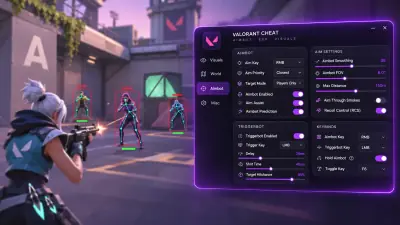
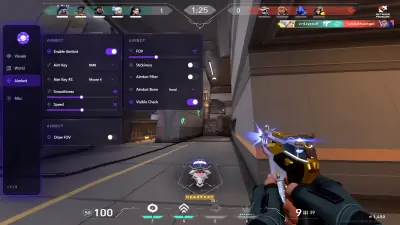
Choose a readable overlay with agent labels, health and shield bars, ability markers and spike tracking. Aim settings include FOV, speed, smoothness and bone selection.
Product Overview
At a glance
Key capabilities
The short list for Valorant Cheats, before the full module list.
Another 3 options are in the full list below.
Overview
Valorant player visuals, world information and aim controls
How the listed modules and the status banner fit a Valorant match.
Valorant rounds turn on information about an angle, a trap or the planted spike. This product separates player ESP from world visuals so you can choose what matters to your next decision. Aim configuration is a third group with its own controls.
Review the complete feature list and Windows requirements before choosing access. Current availability and purchase terms are confirmed through external checkout. The tool remains subject to game updates and account penalties.
Player information that you can filter
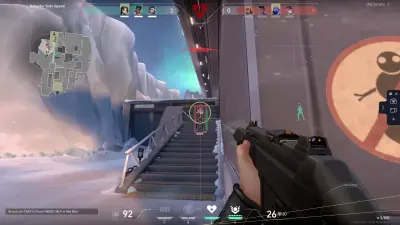
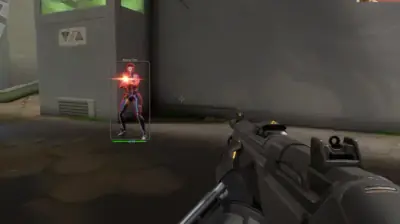
Player ESP combines agent labels with equipment names, health and shield bars. Boxes, skeletons and head circles provide different ways to mark a player. Maximum distance and visibility settings let you reduce the amount shown. Start with a readable combination rather than enabling every marker.
World visuals for abilities and the spike
Ability and trap markers are separate from the player layer. Per-agent options help you focus on utility near an entry or retake route. Spike information includes remaining time and defuse progress. A combat mode hotkey hides ability and trap ESP when you want a clearer player view.
Aim settings and saved configurations
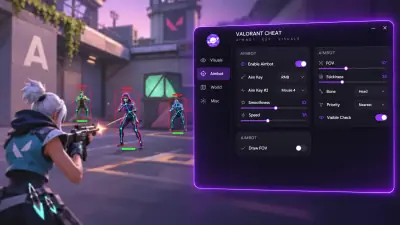
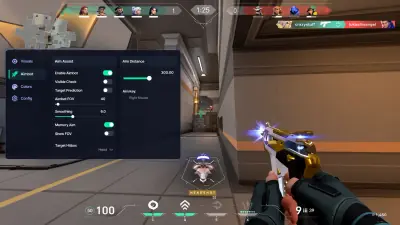
FOV limits the target area. Speed and smoothness control the aim response. Stickiness and the target filter affect selection while bone choice sets the preferred target point. Draw FOV and draw target line make the configuration easier to inspect. Create, save, load or unload profiles for your preferred layout.
Windows setup before purchase
The listing specifies Windows 10 or 11 with Intel or AMD hardware. It requires HVCI, Core Isolation, TPM and Secure Boot. Cloud DMA is listed as a separate dependency for full functionality. Confirm the current Windows build and all additional service costs before purchasing. The game launching successfully does not prove that every product prerequisite is met.
Checkout and delivery
View Purchase Options opens the supplied external checkout. Confirm the product, access term and final cost there. After payment, use the order account for the current download and instructions. Contact support with your order reference if delivery or setup is unclear.
Updates and account risk
Valorant and Vanguard updates can change compatibility. Stop and check the current release when a patch lands. This site does not promise detection immunity, a fixed update deadline or a particular competitive result. Third-party tools can lead to account and hardware restrictions.
Modules
What's included
The full option list for Valorant Cheats. Each line can be switched in the menu.
- Player ESP
- Health and shield bars
- Agent and equipment labels
- Skeleton, boxes and head circles
- Distance and view direction
- Ability and trap markers
- Per-agent world settings
- Spike time and defuse progress
- Aimbot FOV
- Smoothness and speed
- Stickiness and target filter
- Bone selection and visibility check
- Draw FOV and target line
- Combat mode hotkey
- Font size
- Create, save, load and unload configs
Experience
Product information
Choose a readable overlay with agent labels, health and shield bars, ability markers and spike tracking. Aim settings include FOV, speed, smoothness and bone selection.
Product information
- Layer A
Valorant interface
Aim settings beside player outlines in a Valorant scene.
- Layer B
Icebox gameplay
Player outlines and a circular aim marker in an Icebox capture.
- Layer C
Aim controls
A supplied interface image showing FOV, smoothing and key bindings.
More products
Pairs well with
Utilities sold beside the cheat. Each one keeps a separate page.
- HWID Spoofer After a hardware flag, this license rewrites disk serials. It also rewrites MAC addresses, GPU IDs, and related fingerprints. Trace cleanup is in the same license. View details: HWID Spoofer
- Cloud DMA Cloud DMA may require GREENWARD, Static Server and AWS as separate purchases. Check the full requirements and current price at checkout. View details: Cloud DMA
- Skin Changer A small client paints premium weapon skins on your screen. Outfits and knife variants are included, across the major titles it lists. View details: Skin Changer
FAQ
Questions about this page
Answers for this page. The FAQ page holds the rest.
Blog
Related guides
Filter by topic to find setup guides, feature deep-dives, and patch-day notes.
Valorant is a game decided by who knows more, not who aims better. Here is what the build shows, how the aimbot is tuned, and how it survives Vanguard.
Boxes on enemies is the easy part. The Valorant ESP layer that actually changes rounds is the utility and spike tracking, and it needs different settings.
Valorant's TTK is short enough that a weak aimbot wins fights. Set FOV, smoothing, stickiness and bone in the right order and it stops looking mechanical.
Vanguard wants TPM 2.0 and Secure Boot before Valorant will even launch. Get those right first, then follow the install order exactly.
VAN errors are not cheat errors, they are Vanguard refusing your firmware. Patch failures are a different thing. Identify which one you have before you touch anything.
Vanguard is the reason Valorant cheat setup starts in BIOS. What it actually checks, why it demands TPM and Secure Boot, and where the real risk sits.
Valorant
Read discussion
Read-only archive of supplied discussions. Statements are contributors’ opinions and are not verified product guarantees.
- Valorant what does xray actually mean in valorant, and what is visible check Beginner question thread. Xray and visible check get explained as opposites, and the replies get into why seeing everything can actually make you play worse.
- Buying and Delivery xray or private, and who is each one actually for Buying decision thread with a genuine split. The wallhack crowd says info is the whole advantage in Valorant, the private crowd says the smaller userbase and combat tools are the point.