
HWID Spoofer for Valorant PCs
Disk serials, MAC addresses, and GPU IDs get a new pass. The cleaner in the license runs before the next sign-in.
At a glance
Hwid Spoofer: What a hardware refresh covers
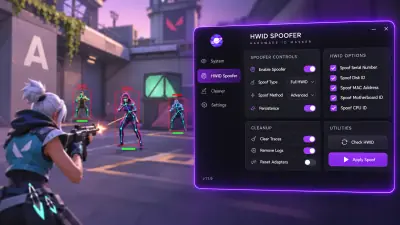
After a hardware flag, the panel can rewrite disk IDs. It can rewrite MAC IDs and GPU IDs, and related IDs. The aim is a sign-in on this PC. Tables lower on the page list the rows.
2 further rows are in the feature table lower on the page.
Overview
A refresh when the block is this PC
Which IDs the panel rewrites, which anti-cheat families are listed, and how a machine flag differs from an account sanction.
The panel covers disk serials, MAC addresses, GPU IDs and related hardware fingerprints, with a cleaner included in the package. Before using it with Valorant, confirm the current Riot Vanguard compatibility notes and follow the instructions for your release. An identifier change does not guarantee that sign-in will succeed.
Other computers can take a new login while this one stops it at once. That is the case for this product. A sanction stored on the account record stays. Tooling on the two licenses is the same.
Flags that stay with the machine
A hardware flag follows the PC. Changing the username does not move it. If other rigs accept a sign-in and this one rejects every new account, refresh the identifiers. Disk serials are rewritten in the panel. MAC addresses, GPU IDs, and related fingerprints are in that same pass. Sign-in can then use a clean hardware profile. A sanction that remains on the account is not lifted.
Valorant and Riot Vanguard compatibility
Check the current release notes for Valorant and Riot Vanguard compatibility before checkout. Vanguard updates can change compatibility, and a hardware identifier change does not remove an account sanction. Spoofing can conflict with publisher terms and lead to further restrictions.
Cleanup that ships with the license
A cleaner is included and it removes leftover traces after the spoof. Finish the identifier changes, run that cleanup, and start the game in the order the current portal guide gives.
Requirements on this PC
Windows 10 or 11, 64-bit, is the OS here. The spoof and the cleaner need administrator rights. In Windows Security, HVCI and Core Isolation stay on. Internet stays up for activation and updates. In firmware, TPM and Secure Boot stay on.
Listed rows
IDs and the published families
A row names a fingerprint field the panel edits, or an anti-cheat family written on this page.
- Disk serial rewrite
- MAC address rewrite
- GPU identifier rewrite
- Related hardware fingerprints
- Trace cleaner in the license
- Riot Vanguard (Valorant)
After checkout
Product information
Which IDs the panel rewrites, which anti-cheat families are listed, and how a machine flag differs from an account sanction.
Product information
- Layer A
HWID interface
Supplied banner showing identifier and cleanup controls.
- Layer B
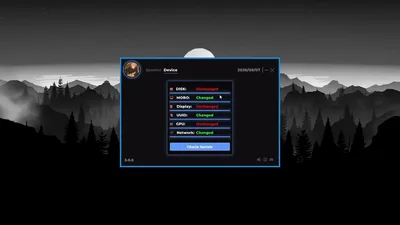
Serial check
Hardware identifier check panel.
- Layer C
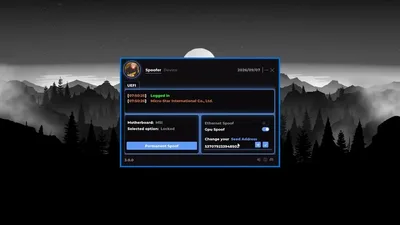
UEFI panel
Firmware identifier settings panel.
More products
Pairs well with
The other licenses sold here. Open one to see its page and its checkout.
- Valorant Cheats Player ESP, world visuals and adjustable aim controls for Windows. View details: Valorant Cheats
- Cloud DMA Cloud DMA may require GREENWARD, Static Server and AWS as separate purchases. Check the full requirements and current price at checkout. View details: Cloud DMA
- Skin Changer A small client paints premium weapon skins on your screen. Outfits and knife variants are included, across the major titles it lists. View details: Skin Changer
FAQ
Questions about this page
Answers for this page. The FAQ page holds the rest.
Blog
Related guides
Filter by topic to find setup guides, feature deep-dives, and patch-day notes.
VAN 152 follows the machine, not the login. Here is how the fingerprint works, why a reinstall is pointless, and the sequence that actually clears a flagged PC.

Vanguard is the reason Valorant cheat setup starts in BIOS. What it actually checks, why it demands TPM and Secure Boot, and where the real risk sits.
Valorant
Read discussion
Read-only archive of supplied discussions. Statements are contributors’ opinions and are not verified product guarantees.