
Valorant HWID Ban: What VAN 152 Means and How to Get Back In
VAN 152 follows the machine, not the login. Here is how the fingerprint works, why a reinstall is pointless, and the sequence that actually clears a flagged PC.
VAN 152 indicates a hardware restriction in Valorant. Check the exact error and the affected account through Riot Support before deciding what to do next.
Hardware restrictions and account restrictions are different. Reinstalling Windows does not resolve an account sanction or guarantee that a hardware restriction is removed.
Why formatting does nothing
Hardware restrictions can remain after reinstalling Windows. Riot does not publish a complete list of identifiers used in every hardware decision. Treat claims about exact fingerprint coverage with caution.
A Windows install lives on top of that hardware. Formatting replaces the install and leaves the fingerprint intact. So you come back to a clean Windows, log in, and get VAN 152 again, which is where most people conclude the spoofer market is a scam.
What a spoofer does
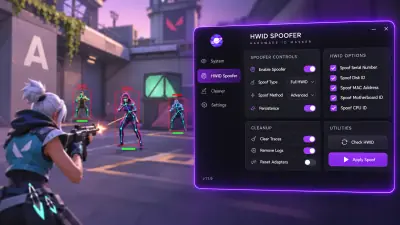
It rewrites the identifiers the fingerprint is built from, so the machine reports as something Riot has not flagged.
The HWID Spoofer page describes disk serials, MAC addresses, GPU IDs and related hardware identifiers, plus an included cleaner. For Valorant, check the current Riot Vanguard compatibility notes before using the tool. Changing hardware identifiers does not remove an account sanction or guarantee access.
The order, and why it matters
- Close Valorant and the Riot Client completely, including the tray
- Run the cleaner
- Run the spoof
- Reboot, because identifiers at firmware level need it
- Confirm the values changed
- Launch the client and log in on a clean account
Do not spoof with the game open. Do not skip the reboot. And do not log into the banned account first to "check", because a banned account proves nothing either way and burns the attempt.
Requirements
HVCI on, Core Isolation on, TPM on, Secure Boot on, Windows 10 or 11 64-bit, administrator rights for both the clean and spoof steps, stable connection for activation.
A successful game launch does not confirm every product prerequisite. Check each security requirement separately against the current installation instructions.
Cloud DMA is required for full functionality, same as the rest of the stack. If you already run the cheat build, that layer is in place.
When a spoofer is the wrong tool
Account ban only. If a fresh account works fine on the machine, the hardware is clean and you do not need this. Run the test before you buy.
Login works, game works, account is empty. That is an account ban. Nothing to spoof.
You already have a hardware DMA setup. Not a reason to avoid a spoofer, just be aware the two are separate layers and the spoofer does not interact with the DMA stack.
What can still go wrong
Vanguard updates its checks. If a spoofer version falls behind, an attempt can fail and the next move is a second attempt with different values rather than buying a second tool.
If the flag sits on something not covered, the spoof comes up short. Cleaner first, then spoof, then reboot, then test.
If Riot manually reviewed the account for a specific reason, hardware is irrelevant to that account. You can be spoofed and still not get the character back.
After you are back
Assume the thing that earned the ban is still your pattern. The habits that keep an account alive are boring: do not queue on a stale loader, do not play every waking hour, do not run a wide FOV aimbot that gets called out in the first round.
If VAN 152 returns, stop and review the restriction with support before making more changes.